Testing with the “admin” user

One of the most common patterns when working with CQ5 in a demo or development environment is the use of the “admin” account for all kind of purposes. Be it content creation, administering and also testing. The best example is David Nüscheler, who regularly uses the admin account in his demos 🙂

This account has a big advantage, when it comes to demos: You don’t have any limits and you can change configurations on the fly without logging in twice with different accounts. Great deal.

But I see also many developers and testers, which execute their tests using the “admin” account. While on the pure functional stuff it doesn’t look like that important, what user is used (“I only check if I get the right result, and this result is not influenced by any ACL!”), there are some hidden drawbacks, which come up every now and then.

First, the admin user doesn’t have any ACL, therefor any code within CQ5, which has an admin session tied to the request, has all possibilities to read and write in the repository. If you have a team of not-so-experienced developers, you might get code, which does some things not in a way you expect. For example it tries to update tags, when you modify a page. On a developer test (developers usually work with the admin user) this isn’t a problem. A tester working as admin also doesn’t see any issues. Unless your code hits production. Then an editor which updates content will face an internal server error, because she isn’t allowed to modify tags. (The experienced developer will use a admin-session for this, which doesn’t show this error, but the design approach is bad as well …)

And as a second aspect, code accessing the repository using an admin session has a different runtime performance than a session by other users. This is mostly caused by direct shortcuts in the code and by the avoidance of ACL checks. This runtime performance effect is mostly visible in performance tests, when requests issued with the admin account are faster than requests made by a regular user account. So if you do performance tests, build a set of regular users and use them instead of the admin account.

So, if you test, don’t test only with “admin”. Use different users as well. Because out there most editors work with a limited account.

CQ5 requesting itself

I recently came again over a developer behaviour, which is quite common: Check how a certain action can be performed, and then reproduce it in code.

For example: How do I start a certain workflow in CQ5 via code? The easiest way to find this out is to perform this action within the UI and then replay the request. That means sending a POST request to localhost:4502/etc/workflows/instances with a number of POST parameters. A developer might then start thinking about using httpclient to send a HTTP request to CQ5 itself to start a certain workflow.  But because this request needs authentication, the developer requires some user with enough permissions to start the workflow, in the worst case “admin” is hardcoded as password 😦

This approach has several severe drawbacks:

  1. The port might not be 4502 …
  2. A password must be provided, because on authoring all ressources are protected by ACLs.
  3. You need to parse the returncode to check if something went wrong.

In the end that’s pretty much work to do. Just because the developer wasn’t aware of the WorkflowService. Same applies to many other features of the UI.

So one thing is quite important to know: Every feature of the UI can be accessed also by other means, without remote control over HTTP. In most (all?) cases there are services available, which allow direct access to that functionality via a regular Java API. So if you are a developer looking to access some piece of functionality, lookup the API docs and the Felix console. You’ll certainly find that feature, especially if it’s that prominent as the WorkflowService. If you are an admin, check your installation and deployment guidelines and make sure, that none of the 3 items above are required.

But … there is one (and only one) valid requirement to send a request from CQ5 to itself: If you want to get hold of a rendered resource. For example you need to build a ZIP archive out of pages beneath a page. For this you need these pages rendered. One way would be to reconstruct the way sling request processing works. The other and easiest way is to just do a HTTP request and do everything like it is supposed to work. But then you need to provide username/password and the port… But since CQ 5.4 there is a solution for this problem. You can use the SlingRequestProcessor service to inject a HttpServletRequest and HttpServletResponse object, plus a ResourceResolver (which is already authenticated!). You need to provide your own mock implementations of these, plus a method, which returns the body of the response.

Disk space consumption

Disk space got cheap today, my favorite dealer currently sells 2 Terabyte disks for less than 100 Euro. Of course this price does not cover redundancy, backup, and of course enterprises don’t buy consumer hardware… Though, even for them 1 terabyte of disk space should be affordable.  Well, sometimes you don’t get that impression. You have to fight for funding each and every gigabyte. So, sometimes disk consumption is a real problem…

So, let’s discuss some causes for disk consumption with CRX and TarPM. The TarPM consists of 4 parts:

  1. the tar files
  2. the journal
  3. the index
  4. the datastore

The tar files

The TarPM is an append-only storage and therefor every action done on the repository; see the documentation on the docs. In the default configuration it consumes 100 megabyte for a single version file. So this shouldn’t be a problem in any case (even if you don’t do clustering, you can neglect the additional disk space consumption).

The index

The index is Apache Lucene based, and a has a add-and-merge strategy; while additional segments are added as dedicated files, these segments are merged in times of lowlevel acitivities to the main index. And when content is removed (and therefor shouldn’t be available anymore in the index), the respective parts of the index are deleted. So the index shouldn’t give you any problems. In case the index grows too large, you can tweak the indexing.xml, but for normal usecases that shouldn’t be necessary.

The datastore

As the TarPM the datastore  (see the docs) is an append-only storage in the first place. Large binaries are placed there and referenced from the TarPM; but there are no references from the datastore to the TarPM, so when a node is removed in the tarPM, this reference is removed, but not the datastore object. That’s the case because it might be referenced from other nodes as well, but at this point this is not known. So we might have objects in the datastore which are not referenced anymore. The cleanup these the Datastore Garbage Collection checks all references to the datastore and removes the objects, which are not needed any more.

What you should be aware of

If you need to reclaim storage, consider this:

  • Versioning: Just removing pages is often not sufficient to reclaim the space they consume, because they are still kept as versions.
  • Large childnode lists can affect the size of the TarPM itself quite heavily: Every addition of a new child creates a new copy of the parent node (including a childnode list, which continously grows). So beside the performance impact of such large lists there is also an impact on disk consumption.
  • As a recommendation run the TarOptimizer on a daily basis, and the Datastore Garbage Collection on a monthly (or even quarterly) basis. First run the TarOptimizer, then the Datastore Garbage Collection.

CRX 2.3: snapshot backup

About a year ago I wrote an improved version of backup for CRX 2.1 and CRX 2.2. The approach is to reduce the amount of data which is considered by the online backup mechanism. With CRX 2.3 this apprach can still be used, but now an even better way is available.

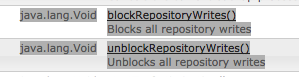
A feature of the online backup — the blocking and unblocking of the repository for write operations — is now available not only to the online backup mechanism, but can be reached via JMX.
JMX view

So, by this mechanism, you can prevent the repository from updating its disk structures. With this blocking enabled you can backup all the repository and then unblock afterwards.

This allows you to create a backup mechanism like this:

  1. Call the blockRepositoryWrites() method of the “com.adobe.granite (Repository)” Mbean
  2. Do a filesystem snapshot of the volume where the CRX repository is stored.
  3. Call “unblockRepositoryWrites()
  4. Mount the snapshot created in step 2
  5. Run your backup client on the mounted snapshot
  6. Umount and delete the snapshot

And that’s it. Using a filesystem snapshot instead of the online backup accelerates the whole process and the CQ5 application is affected (step 1 – 3) only for a very small timeframe (depending on your system, but should be done in less than a minute).

Some notes:

  • I recommend snapshots here, because they are much faster than a copy or rsync, but of course you can use these as well.
  • While the repository writes are blocked, every thread, which wants to do a write operation on the repository, will be blocked, read operations will work. But with every blocked write operation you’ll have one thread less available. So in the end you might run into a case, where no threads are available any more.
  • Currently the UnlockRepositoryWrites call can be made only by JMX and not by HTTP (to the Felix Console). That should be fixed within the next updates of CQ 5.5. Generally speaking I would recommend to use JMX directly over HTTP-calls via curl and the Felix Console.

CQ 5.5: Changes to the startup

Since already a month CQ 5.5  is out. See here for the major changes brought with this release.

Amongst the hundreds of new features I would like to point out a single one, which is probably the most intersting features for admins and operation people.
With CQ 5.5 the quickstart does no longer start a servlet engine with 2 webapplications deployed in it (crx.war for the CRX and launchpad.war for the OSGI container including Sling and CQ5 itself). But as now CRX has been adapted work inside an OSGI container it is possible to drop the artifical differentiation between CRX and the other parts of the system, but handle them alike inside Apache Felix. The same applies to the CQSE servlet engine; it’s now an service embedded into OSGI (so the server.log file is gone). So the quickstart starts the Felix OSGI container which then takes care of starting the repository services, the servlet engine and all other services introduced by Sling and CQ5. This streamlined the startup process a lot. And — finally — there is only 1 place where you need to change the admin password.

Speaking of the start script: It has changed also. Essentially it has been rewritten, and a lot of old cruft; when I started with Communique 3.5 the basic structure of the serverctl script was the same as of CQ 5.4. It is much easier to understand, but the out-of-the-box version has a major flaw, as it doesn’t redirect the stdout and stderr to dedicated logfiles, but let them print on the console. This at least annoying, but more often just a problem; for example the threaddumps of a Sun/Oracle JVM are printed to stdout and are lost then. Same applies to the garbage collection logs (if not redirected to a specific file).

So instead of

java $CQ_JVM_OPTS -jar $CQ_JARFILE $START_OPTS &
        echo $! > "conf/cq.pid"

use these lines:

(
        (
                java $CQ_JVM_OPTS -jar $CQ_JARFILE $START_OPTS &
                echo $! > "conf/cq.pid"
        )  | /usr/sbin/rotatelogs2 stdout.log 5M 2>&1
) &

It requires the rotatelogs2 utility (depends a bit on your system; might also be named as “rotatelogs”)     shipped with the Apache HTTPD webserver (SuSE Linux: apache2 package), and it enures that the logs are rotated correctly when their configured size (here: 5 megabytes) are reached.

(No need to report this on Daycare, it’s already submitted.)

Custom dispatcher invalidation rules

Most web sites use different approaches of caching to improve their performance, some within the application and some on the delivery side of the site, such as a content delivery network (CDN) or a simple reverse proxy like squid or varnish. Of course all of these can also be used together with CQ5, the default caching approach on the delivery side of CQ5 is the dispatcher.

The dispatcher is a pretty straight-forward cache, which has some built-in rules for invalidation. The most important rule is: Whenever a page is invalidated, all pages, which are located deeper in the content hierarchy below this page, are invalidated as well.

Some background: This might be based on the assumption, that a change on any page can influence the appearance of pages higher in the hierarchy; you should think of a change of the page title, which must be reflected in the navigation items of all other pages in that area. Combined with the /statfileslevel parameter you should be able to deliver always a correctly rendered page and never outdated content. At the cost of the cache hit ratio in the dispatcher.

I already described the inner working of the dispatcher in an older article. Knowing these internals also give you some more options if you want to tune this. In the following I describe an approach, which allows you to implement custom invalidation rules. The caching and the delivery of the cached files doesn’t change, only the cache invalidation.

The basic idea is to replace the call to /dispatcher/invalidate.cache (which is the standard handler for cache invalidation) by a custom script, which runs the invalidation on the cache. This custom script is configured as target URL in the invalidation agent(s) and updates the “last modification date” of the statfile according to your requirement.

For example you can have this perl script, which should behave like the dispatcher invalidation logic:

/usr/bin/perl -w
use strict;
use CGI;
use File::Find;
use File::Touch;
my $cacheroot = "/opt/www/docroot";
my $q = CGI->new;
my $path = q->param("Handle");
my $invalidation_path = $cacheroot . $path;
File::Find::find({wanted => \&wanted}, $invalidation_path);
exit;

sub wanted {
  my $f = shift;
  if ($f =~ /\.stat/) {
    touch ($f);
  }
}

Configure this script as a CGI on “/dispatcher/custom.invalidation”, then configure your invalidation accordingly, and voila, you’re done. You run your custom invalidation script. If you don’t like the standard behaviour (obviously you don’t …), adjust the logic in the wanted procedure.

CQ5 init script

Nearly all Unix flavors have the notion of so-called initscripts, which are executed at startup (or when you switch the runlevel) and which start all required services or adapt settings. Usually all daemon and server processes are started via such initscripts. CQ5 doesn’t provide such a script out-of-the-box, but a rather complex shell script called “serverctl”, which performs many steps you would expect from a initscript:

  • assembling parameters
  • setting environment variables
  • start/stop/status of the server process (start and stop are also available a separate scripts for ease of use)

This would easily qualify this script as a initscript, but it lacks one important task: Changing the uid for the to-be-started process, it doesn’t run as root user. While from a purely functional perspective this isn’t important, every sysadmin will tell you, that you shouldn’t run processes as root, when they don’t require such permissions to perform their tasks. And the security guys won’t even let you golive with such a setting. So if you write an init script, you should add this functionality there.

And one last plea: Do not start the java process directly in the initscript and assemble the commandline yourself, but call the start&stop scripts. Especially if you are not that familiar with the serverctl script. So, a simple initscript  could look like this:

#!/bin/sh
CQ5_ROOT=/opt/cq5
CQ5_USER=cq5

######## 
SERVER=${CQ5_ROOT}/crx-quickstart/server 
START=${SERVER}/start 
STOP=${SERVER}/stop 
STATUS="${SERVER}/serverctl status" 

case "$1" in 
  start) 
    su - ${CQ5_USER} ${START} 
  stop) 
    su - ${CQ5_USER} ${STOP} 
  status) 
    su - ${CQ5_USER} ${STATUS} 
  *) 
    echo "Unknown argument $1" 
esac

Meta: adaptTo, CQ Blueprints

Last week the adaptTo  event happened in Berlin/Germany, which was a smaller conference related to Apache Sling, Jackrabbit and also CQ5 (or WEM, how it’s called now in Adobish). Sadly I wasn’t able to attend for family reasons, but you can download all slides on the website of pro!vision, sponsor of that conference. I especially like the presentation by Jukka (Jackrabbit/CRX performance tuning), as he shows many design principles of Jackrabbit, which have an influence on performance. And every developer and application designer working with sling should have a look at the presentation by Achim Schermuly-Koch, as he covers a very interesting security and also performance pattern, which affects many sites.

Another intesting site I recently fell about is CQ Blueprints, which has the claim to collect best practices for CQ 5.2 till CQ 5.4; I browsed through and found some interesting ideas, but also some tips, which are not “best practices” in my opinion. Haven’t found the time to write constructive comments there.

A short outlook: I plan to write short posts about “init scripts for CQ5” and “dispatcher invalidation”. The latter topic is rather intesting, as I recently adviced several people to bypass the regular invalidation, while in the last years there was never a need to do so. So, stay tuned.

Java 7 support for CQ5?

As Java 7 has been launched these days, the question arises real soon: “Does Adobe support Java 7 as runtime for CQ5?”.

So, the clear answer is: No, it isn’t supported. Mostly because of some issues which can cause corruptions in the Lucene index. So, of course, you give it a try and tackle the risk yourself (as you can run CQ5 on a Windows 7 box or on Debian Linux); but don’t complain, if you receive some strange behaviour.

ps: Just adding -XX:-UseLoopPredicate to your JVM parameters won’t solve the problem (according to the Lucene Website).

Adding JMX-support

CQ5 (even in its latest incarnation CQ 5.4) has a rather poor support for monitoring. If you take a look at the system via the popular “jconsole” tool, you don’t get any useful mbeans, which can tell you anything about the system. Only some logging stuff.

If you decide to instrument your code and provide some information via JMX (that’s something I would recommend to everyone, who adds non-trivial services to CQ5), have a look at Apache Aries, especially at the JMX whiteboard. Deploy this bundle to your CQ5 and then just register your mbeans as services. Voila, that’s it. You don’t need to register and unregister your mbeans, as this is handled by the JMX whiteboard.

Sadly documentation is currently rather poor, but the sourcode isn’t that hard to understand. You can start with the initial patch in the Aries issue tracking.