Long running sessions and SegmentNotFoundExceptions

If you search this blog, you find one recurring theme over the years: The lifecycle of JCR sessions and Sling ResourceResolvers. That you should not keep them open for a long time. And that you definitely have to close them. But I never gave you an example what can happen if you don’t follow this recommendation. Until now.

These days I learned that was is actual problem which can arise because of it. And the problem is called “SegmentNotFoundException”.

In the past a SegmentNotFoundException was a clear indication of a corrupt JCR repository. The recommendation was always either to fix it or to restore from backup. Both operations are tedious, require downtimes and possibly also mean a loss of data. That’s probably also the reason why this specific problem is often taken for the sign of such a repository exception. So let’s systematically look at it.

The root cause

With AEM 6.4 the feature of “tail-compaction” was introduced, which is a version of the online compaction feature. It is less efficient but takes less time than the full compaction. By default in AEM the tail compaction runs daily and the online compaction once a week.

But from what I understood, this tail compaction has a problem with long running sessions, and it can happen, that tar files are compacted and removed, which are still referenced. That means, that it’s not really a on-disk corruption which needs to be fixed, but rather that some “old sessions” (read about MVCC in the previous post) are referencing data which is not there (anymore).

An unclosed session – a symbol photo (by engin akyurt on Unsplash)

Validate the symptoms

This problem I describe in this post happens under some special circumstances, which you should check first before you start the hunt for long-running sessions:

  • You get SegmentNotFoundExceptions (always with the same segment ID).
  • A repository check doesn’t find any inconsistency.
  • If you restart the instance, the error is gone, but appears again after some time (mostly at least a day).
  • You are running AEM 6.4 or AEM 6.5 (SP doesn’t seem to matter).

In the case I observed, only a single workflow step was affected, but not all the time and only after some time, which made me believe that it was related to the compaction. But it was very hard to track down the error, because the workflow step itself was complex, but safe.

The solution

Fix any long-running session in your application (unless you are registering an ObservationListener in there, which takes care of the refreshs by design). Really all. Use the JMX webconsole plugin and check the list of registered session mbeans every day on a production instance. Count them. Look at the timestamps when the session was opened.

 In the case I observed, the long running session was in a different area of the application, but was working on the same data (user profiles) as the failing workflow step. But the 2 areas in the code were totally unrelated to each other, so that was the only way to track it down.

Final words

Some other notes, which I consider as important in this context:

  • When you encounter a SegmentNotFoundException, please always open a support ticket, just in case. If it’s a different issue than described here, it’s better if you have that ticket open already.
  • If you see exactly this issue, and changing your application code makes this problem go away, please also raise a support ticket. That bug should get fixed (even if long-running sessions are not recommended since years).
  • As mentioned, when you encounter this issue, it’s not a persisted corruption. Restarting will cause the issue not to appear for some time, but that should only buy you time to identify and fix the long running sessions.
  • And AEM as a Cloud Service is not affected by this problem, because neither Online Compaction nor Tail Compaction are used. Instead the Golden Master is offline compacted before cloning.

Long running sessions and clustering

In the last blog post I briefly talked about the basics what to consider when you are writing cluster-aware code. The essence is to be aware of your write activities, and make sure that the scheduled activities are running only on a single cluster node and not on many or all of them.

Today’s focus is on the behavior of JCR sessions with respect to clustering. From a conceptual point of view there is hardly a difference to a single-node cluster (or standalone instance), but the presence of more cluster nodes add a new angle of potential problems to it.

When I talk about JCR, I am thinking of the Apache Oak implementation, which is implemented on top of the MVCC pattern. (The previous Jackrabbit implementation is using a different approach, so this whole blog post does not apply there.) The basic principle of MVCC is that each session is clearly separated from any other session which is open in parallel. Also any changes performed on a session is not visible to other sessions unless

  • the other session is invoking session.refresh() or
  • the other session is opened after the mentioned session is closed.

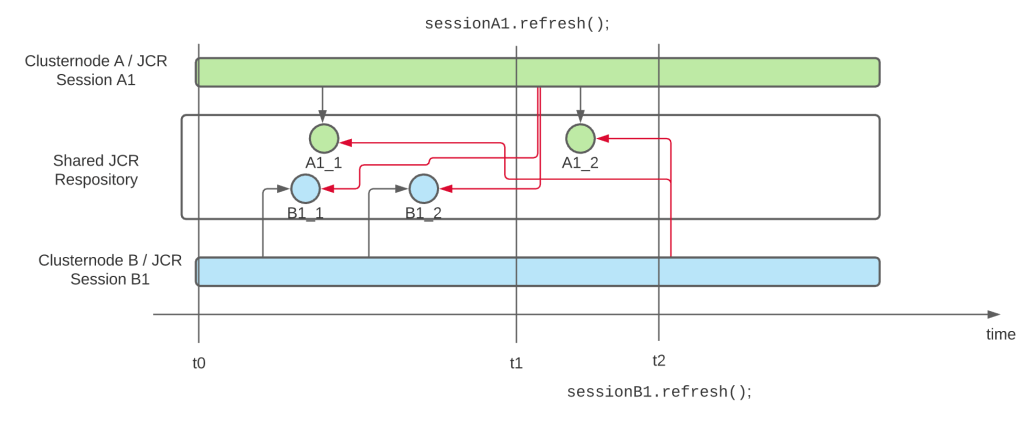
This behavior applies to all sessions of a JCR repository, no matter if the are opened on the same cluster node or not. The following diagram visualizes this

Diagram showing how 2 sessions are performing changes to the repository whithout seeing the changes of the other as long as they don’t use session.refresh()

We have 2 sessions A1 and B1 which are initiated at the same time t0, and which perform changes independently of each other on the repository, so session B1 cannot see the changes performed with A1_1 (and vice versa). At time t1 session A1 is refreshed, and now it can see the changes B1_1 and B1_2. And afterwards B1 is refreshed as well, and can now see the changes A1_1 and A1_2 as well.

But if a session is not refreshed (or closed and a new session is used), it will never see the changes which happened on the repository after the session has been opened.

As said before, these sessions do not need to run on 2 separate cluster nodes, you get the same behavior on a single cluster node as well. But I mentioned, that multiple cluster nodes are a special problem here. Why is that case?

That problem are OSGI services in the background, which perform a certain job and write data to the JCR repository. In a single-node cluster this not a problem, because all of these activities go through that single service; and if that service uses a long-running JCR session for it, that will never be a problem. Because this service is responsible for all changes, and the service can read and write all the relevant data. In a cluster with more than 2 nodes, each cluster node might have that service running, and the invocations of the services might be random. And as in the diagram above, on cluster node A the data A1_1 is written. And on cluster node 2 the data point B1_1 is written. But they don’t see each other’s changes if they don’t refresh the session! And in most applications, which are written for single-node AEM instances, session.refresh() is barely used, because in such situations there’s simply no need for it, as this problem never occurred.

So when you are migrating your application to AEM as a Cloud Service, review your applications and make sure that you find all long-running ResourceResolvers and JCR sessions. The best option is then to remove these long-running sessions and replace them with short-living ones, which are closed if the job is done. The second-best option is to introduce a session.refresh(), so the session sees any updates which happend to the repository in the meanwhile. (And btw: if you registering an ObservationListener in that session, you don’t need a manual refresh, as this refresh is done by the ObservationListener method anyway; what would it be for if not for reporting changes to the repository, which happen after opening the session?)

That’s all right now regarding cluster-aware coding. But I am sure that there is more to come 🙂

Cluster aware coding in AEM

With AEM as a Cloud Service quite a number of small things have changed; and next to others you also get real clustering support in the authoring environment. Which is nice, because it gives you downtime-less authoring during deployments.

But this cluster also comes with a few gotchas, and one of them is that your application code needs to be cluster-aware. But what does that mean? What consequences does it have and what code do you have to change if you have never paid attention to this aspect?

The most important aspect is to do “every change only once“. It doesn’t make sense that 2 cluster nodes are importing the same set of data. A special version of this aspect is “avoid concurrent writes to the same node“, which can happen when a scheduled job is kicked off at the same time on all nodes, and this job is trying to change something in the repository. In this case you don’t only have overhead, but very likely a lot of exceptions.

And there is a similar aspect, which you should pay attention to: connections to external systems. If you have a cluster, running the same code and configs, it’s not always wanted that each cluster node reaches out to that external system. Maybe you need to the update it with the latest content only once, because it triggers some expensive processing on their side, and you don’t want to have that triggered two or three times, probably pretty much at the same time.

I have mentioned you 2 cases where a clustered application can be behave differently than a single-node environment, now let me show you how you can make your application cluster-aware.

Scheduled jobs

Scheduled jobs are a classic tool to execute certain jobs at a certain time. Of course we could use the Sling Scheduler directly, but to make the execution more robust, you should wrap it into a Scheduled Sling Job.

See the Sling Jobs website for the documentation and some example (although the Javadocs are missing the ScheduleBuilder class, but here’s the code). And of course you should check out Kaushal Mall’s post with even more examples.

Jobs give you the guarantee, that this job is going to be executed only at least once.

Use the Sling Scheduler only for very frequent jobs (e.g. once every 5 minutes), where it doesn’t matter if one execution is skipped, e.g. because the instance was just restarting. To limit the execution of such a job to a single node, you can annotate the job runner with this annotation:

@Property (name="scheduler.runOn", value="SINGLE")

(see the docs)

What about caches?

In-memory caches are often used to speed up operations. Most often they contain the results of previous operations which are then reused; cache elements are either actively purged or expire using a time-to-live.

Normally such caches are not affected by clustering. They might contain different items with potentially different values in the cluster nodes, but that must never be a problem. If that is a problem, you have to look for a different approach, e.g. persisting the data to the repository (if they are not already coming from there) or externalizing the cache (e.g to a redis or memcached instance).

Also, having a simpler application instead of the highest-cache-hit ration possible is often a good trade-off.

Ok, these were the topics I wanted to discuss here. But expect a blog post about one of my favorite topics: “Long running sessions and clustering“.