Writing backwards compatible software

On last week’s adaptTo() conference I discussed the topic of AEM content migration with a few attendees, and why it’s a tough topic. I learned that the majority of these adhoc-migrations are done, because they are mandated by changes in the components themselves. And therefor migrations are required to adhere to the new expectations of the component. My remark “can’t you write your components in a way, that they are backwards compatible” was not that well received … it seems that it this is a hard topic for many.

And yes, writing backwards compatible components is not easy, because it comes with a few prerequisites:

  • The awareness, that you are making a change, which breaks compatibility with existing software and content. While the breakages in “software” can be detected easily, the often-times very loose contract between code and content is much harder to enforce. With some experience in that area you will develop a feeling for that, but especially less experienced folks can make such changes inadvertently, and you will detect that problem way too late.
  • You need to have a strategy which tells how to handle such a situation. While the AEM WCM Core Components introduced a versioning model, which seems to work quite nicely, an existing codebase might not be prepared for this. It forces some more structure and thoughts how to design your codebase, especially when it then comes to Sling Models and OSGI services, and where to have logic, so you don’t duplicate it.
  • And even if you are prepared for this situation, it’s not for free, you will end up with new versions of components which you need to maintain. Just breaking compatibility is much easier, because you still will have just 1 component.

So I totally get if you don’t care about backwards compatibility at all, because you are in the end the only consumer of your code, and you can control everything. You are not a product developer, where backwards compatibility needs to have a much higher priority.

But backwards compatibility gives you one massive benefit, which I consider as quite important: It gives you the flexibility to perform a migration to a time which is a good fit. It’s not that you need to perform this migration before, in the midst or immediately after a deployment. You deploy the necessary code, and then migrate thecontent when its convenient. And if that migration date is pushed further for whatever reason, it’s not a problem at all, because this backwards compatibility allows you to decouple the technical aspect of it (the deployment) from the actual execution of the content-migration. And for that you don’t need to re-scope deployments and schedules.

So maybe this is just me with the hat of a product developer, who is so focused on backwards compatibility. And in the wild the cost over backwards-compatibility is much higher than the flexibility it allows. I don’t know. Leave me a comment if you want to share your opinion.

Do not use AEM as a proxy for backend calls

Since I am working with AEM CS customers, I came a few time across the architecture pattern, that requests made to a site to passed all the way through to the AEM instance (bypassing all caches), and then AEM does an outbound request to a backend system (for example a PIM system or other API service, sometimes public, sometimes via VPN), collects the result and sends back the response.

This architectural pattern is problematic in a few ways:

  1. AEM handles requests with a threadpool, which has an upper limit of requests it will handle (by default 200). That means that at any time the number of such backend requests is limited by the amount of AEM instances. In AEM CS this number is variable (auto-scaling), but even in an auto-scaling world there is an upper limit.
  2. The most important factor in the number of such requests AEM can handle per second is the latency of the backend system call. For example if your backend system responds always in less than 100ms, your AEM can handle up to 2000 of such proxy requests per second. If the latency is more likely 1 second, it’s only up to 200 proxy requests per second. This can be enough, this can be way too small.
  3. To achieve such a throughput consistently, you need to have agressive timeouts; if you configure your timeouts with 2 seconds, your guaranteed throughput can only be up to 100 proxy requests/seconds.
  4. And next to all those proxy requests your AEM instances also need to handle the other duties of AEM, most importantly rendering pages and delivering assets. That will reduce the number of threads you can utilize for such backend calls.

The most common issue I have seen with this pattern is that in case of backend performance problems the AEM threadpool of all AEM instances are consumed within seconds, leading almost immediately to an outage of the AEM service. That means, that a problem on the backend or on the connection between AEM and the backend takes down your page rendering abilities, leaving you with what is cached at the CDN level.

The common recommendation we make in these cases is quite obvious: introduce more agressive timeouts. But the actual solution to this problem is a different one:

Do not use AEM as a proxy.

This is a perfect example for a case, where the client (browser) itself can do the integration. Instead of proxy-ing (=tunneling) all backend traffic through AEM, the client could approach the backend service directly. Because then the constraints AEM has (for example the number of concurrent requests) do no longer apply for the calls to the backend. Instead the backend is exposed directly to the endusers, and uses whatever technology is suitable for that; typically it is exposed via an API gateway.

If the backend gets slow, AEM is not affected. If AEM has issues, the backend is not directly impacted because of it. AEM does not even need to know that there is a backend at all. Both systems are entirely decoupled.

As you see, I pretty much prefer this approach of “integration at the frontend layer” and exposing the backend to the endusers over any type of “AEM calls the backend systems”. Mostly because such architectures are less complex and easier to debug and analyze. And that should be your default and preferred approach, whenever this required.

Disclaimer: Yes, there are cases where the application logic requires AEM to do backend calls; but in these cases it’s questionable if such requests need to be done synchronously in requests, meaning that an AEM request needs to do a backend call to consume its result. If these request can be done async, then the whole problem vector I outlined above simply does not exist.

Note: In my opinion hiding the hostnames of your backend system is also not a good reason for such an backend integration. Also “the service is just available from within our company network and AEM accesses it via VPN” is not a good reason, too. In both cases you can achieve the same with an publicly accessible API gateway, which is specifically designed to handle such usecases and all security-relevant implications of it.

So, do not use AEM as a simple proxy!

If you have curl, every problem looks like a request

If you are working in IT (or a crafter) you should know the saying: “When you have a hammer, every problem looks like a nail”. It describes the tendency of people, that if they have a tool, which helps them to reliably solve a specific problem, that they will try to use this tool at every other problem, even if it does not fit at all.

Sometimes I see this pattern in AEM as well, but not with a hammer, but with “curl”. Curl is a commandline HTTP client, and it’s quite easy to fire a request against AEM and do something with the output of it. It’s something every AEM developer should be familiar with, also because it’s a great tool to automate things. And if you talk about “automating AEM”, the first thing people often come up with is “curl”…

And there the problem starts: Not every problem can be automated with curl. For example take a periodic data export from AEM. The immediate reaction of most developers (forgive me if I generalize here, but I have seen this pattern too often!) is to write a servlet to pull all this data together, create a CSV list and then use curl to request this servlet every day/week.

Works great, does it? Good, mark that task as done, next!

Wait a second, on prod it takes 2 minutes to create that list. Well, not a problem, right? Until it takes 20 minutes, because the number of assets is growing. And until you move to AEM CS, where the timeout of requests is 60 seconds, and your curl is terminated with a statuscode 503.

So what is the problem? It is not the timeout of 60 seconds; and it’s also not the constantly increasing number of assets. It’s the fact, that this is a batch operation, and you use a communication pattern (request/response), which is not well suited for batch operations. It’s the fact, that you start with curl in mind (a tool which is built for the request/response pattern) and therefor you build the implementation around it this pattern. You have curl, so every problem is solved with a request.

What are the limits of this request/response pattern? Definitely the runtime is a limit, and actually for 3 reasons:

  • The timeout for requests on AEM CS (or basically any other loadbalancer) is set for security reasons and to keep the prevent misuse. Of course the limit of 60 seconds in AEM CS is a bit arbitrary, but personally I would not wait 60 seconds for a webpage to start rendering. So it’s as good as any higher number.
  • There is another limit, which is determined by the availability of the backend system, which is actually processing this request. In an high-available and autoscaling environment systems start and stop in an automated fashion, managed by a control-plane which operates on a set of rules. And these rules can enforce, that any (AEM-) system will be forced to shutdown at maximum 10 minutes after it has stopped to receive new requests. And that means for a requests, which would take constantly 30+ minutes, that it might be terminated, without finishing successfully. And it’s unclear if your curl would even realize it (especially if you are streaming the results).
  • (And technically you can also add that the whole network connection needs to be kept open for that long, and AEM CS itself is just a single factor in there. Also the internet is not always stable, you can experience network hiccups and any point in time. It’s normally just well hidden by retrying failing requests. Which is not an option here, because it won’t solve the problem at all.)

In short: If your task can take long (say: 60+ seconds), then a request is not necessarily the best option to implement it.

So, what options do you have then? Well, the following approach works also in AEM CS:

  1. Use a request to create and initiate your task (let’s call it a “job”);
  2. And then poll the system until this job is completed, then return the result.

This is an asynchronous pattern, and it’s much more scalable when it comes to the amount of processing you can do in there.

Of course you cannot use a single curl command anymore, but now you need to write a program to execute this logic (don’t write it in a shell-script please!); but on the AEM side you can now use either sling jobs or AEM workflows and perform the operation.

But this avoids this restriction on 60 seconds and it can handle restarts of AEM transparently, at least on author side. And you have the huge benefit, that you can collect all your errors during the runtime of this job and decide afterwards, if the execution was a success or failed (which you cannot do in HTTP).

So when you have long-running operations, check if you need to do them within a request. In many cases it’s not required, and then please switch gears to some asynchronous pattern. And that’s something you can do even before the situation starts to get a problem.

The web, an eventually consistent system

For many large websites, CDNs are the foundation for delivering content quickly to their customers around the world. The ability of CDNs to cache responses close to consumers also allows these sites to operate on a small hardware footprint. However, compared to what they would have to invest if they operated without a CDN and delivered all content through their own systems, this comes at a cost: your CDN may now deliver content that is out of sync with your origin because you changed the content on your own system. This change is not done in an atomic fashion. This is the same “atomic” as in the ACID principle of database implementations.
This is a conscious decision, and it is caused primarily by the CAP theorem. It states that in a distributed data storage system, you can only achieve 2 of these 3 guarantees:

  • Consistency
  • Availability
  • Partition tolerance

And in the case of a CDN (which is a highly distributed data storage system), its developers usually opt for availability and partition tolerance over consistency. That is, they accept delivering content that is out of date because the originating system has already updated it.

To mitigate this situation the HTTP protocol has features built-in which help to mitigate the problem at least partially. Check out the latest RFC draft on it, it is a really good read. The main feature is called “TTL” (time-to-live) and means that the CDN delivers a version of the content only for a configured time. Afterwards the CDN fetches a new version will from the origin system. The technical term for this is “eventual consistent” because at that point the state of the system with respect to that content is consistent again.

This is the approach all CDNs support, and it works very reliable. But only if you accept that you change content on the origin system and that it will reach your consumers with this delay. The delay is usually set to a period of time that is empirically determined by the website operators, trying to balance the need to deliver fresh content (which requires a very low or no TTL) with the number of requests that the CDN can answer instead of the origin system (in this case, the TTL should be as high as possible). Usually it is in the range of a few minutes.

(Even if you don’t use a CDN for your origin systems, you need these caching instructions, otherwise browsers will make assumptions and cache the requested files on their own. Browsing the web without caching is slow, even on very fast connections. Not to mention what happens when using a mobile device over a slow 3G line … Eventual consistency is an issue you can’t avoid when working on the web.)

Caching is an issue you will always have to deal with when creating web presences. Try to cache as much as possible without neglecting the need to refresh or update content at a random time.

You need to constantly address eventual consistency. Atomic changes (that means changes are immediately available to all consumers) are possible, but they come at a price. You can’t use CDNs for this content; you must deliver it all directly from your origin system. In this case, you need to design your origin system so that it can function without eventual consistency at all (and that’s built in into many systems). Not to mention the additional load it will have to handle.

And for this reason I would always recommend not relying on atomic updates or consistency across your web presence. Always factor in eventual consistency in the delivery of your content. And in most cases even business requirements where “immediate updates” are required can be solved with a TTL of 1 minute. Still not “immediate”, but good enough in 99% of all cases. For the remaining 1% where consistency is mandatory (e.g. real-time stock trading) you need to find a different solution. And I am not sure if the web is always the right technology then.

And as an afterthought regarding TTL: Of course many CDNs offer you the chance to actively invalidate the content, but it often comes with a price. In many cases you can invalidate only single files. Often it is not an immediate action, but takes seconds up to many minutes. And the price is always that you have to have the capacity to handle the load when the CDN needs to refetch a larger chunk of content from your origin system.

How to use Runmodes correctly (update)

Runmodes are an essential concept within AEM; they form the main and only way to assign roles to AEM instances; the primary usecase is to distinguish between the author and publish role, and another common usecase is also to split between PROD, Staging and Development environments. Technically it’s just a set of strings which are assigned to an instance, and which are used by the Sling framework at a few occassions, the most prominent being the Sling JCR Installer (which handles the /apps/myapp/config,/apps/myapp/config.author, etc. directories).

But I see other usecases; usecases where the runmodes are fetched and compared against hardcoded strings. A typical example for it:

boolean isAuthor() {
return slingSettingsService.getRunmodes().contains("author");
}

From a technical point of view this is fully correct, and works as expected. The problem arises when some code is based on the result of this method:

if (isAuthor()) {
// do something
}

Because now the execution of this code is hardcoded to the author environment; which can get problematic, if this code must not be executed on the DEV authoring instances (e.g. because it sends email notifications). It is not a problem to change this to:

if (isAuthor() && !isDevelopmentEnvironment()) {
// do something
}

But now it is hardcoded again 😦

The better way is to rely on the OSGI framework soley. Just make your OSGI components require some configuration and define the configuration for the runmodes required.

@Component(configurationPolicy=ConfigurationPolicy.REQUIRED)
public class myServiceImpl implements myService {
//...

This case requires NO CODING at all, instead you can just use the functionality provided by Sling. And this component does not even activate if the configuration is not present!

Long story short: Whenever you see a reference to SlingSettingsService.getRunmodes(), it’s very likely used wrongly. And we can generalize it to “If you add a reference to the SlingSettingsService, you are doing something wrong”.

There are only a very few cases where the information provided by this service is actually useful for non-framework purposes. But I bet you are not writing a framework 🙂

Update (Oct 17, 2019): In a Twitter discussion Ahmed Musallam and Justin Edelson pointed out, that there are usecases around where this actually useful and the right API to use. Possibly yes, I cannot argue about that, but these are the few cases I mentioned above. I have never encountered them personally. And as a general rule of thumb it’s still applicable. Because every rule has its exceptions.

You think that I have written on that topic already? Yes, I did, actually 2 times already (here and here). But it seems that only repetition helps to get this message through. I still find this pattern in too many codebases.

Ways to achieve content reuse in AEM

Whenever an AEM project starts, you have a few important decisions to make. I already wrote about content architeture (here and here) and its importance to a succesful project and an efficient content development and maintenance process. A part of this content architecture discussion is the aspect of content reuse.

Content reuse happens on every AEM project, often it plays a central role. And because requirements are so different, there are many ways to achieve content reuse. In this blog post I want to outline some prominent ways you can use to reuse content in AEM. Each one comes with some unique properties, thus pay attention to them.

I identified 2 main concepts of content reuse: Reuse by copy and Reuse by reference.

Reuse by copy

The AEM multisite manager (MSM) is probably the most prominent approach for content reuse in AEM. It’s been part of the product for a long time and therefor a lot of people know it (even when you just have started with AEM, you might came across its idioms). It’s an approach which creates independent copies of the source, and helps you to keep these copies (“livecopies”) in sync with the original version (“blueprint”) . On the other hand side you still can work with the copies as you like, that means modify them, create and delete parts of the pages or even complete pages. With the help of the MSM you can always get back to the original state, or a change on the blueprint can be propagated to all livecopies (including conflict handling). So you can could call this approach “managed copy”.

The MSM is a powerful tool, but comes with its own set of complexity and error cases; you and your users should understand how it works and what situations can arise out of it. It also has performance implications, as copies are created; also rolling out changes on the blueprint to livecopies can be complex and consume quite some server resources. If you don’t need have the requirement to modify the copies, the MSM is the wrong approach for you!

Unlike the MSM the language copy approach just creates simple copies; and when these copies have been created there is no relationship anymore between the source and the target of the language copy. It’s an “un-managed copy”. Personally I don’t see much use in it in a standalone way (if used as part of a translation workflow, the situation is different).

Reuse by reference

Reuse by reference is a different approach. It does not duplicate content, but just adds references and then the reference target is injected or displayed. Thus a reference will always display the same content as the reference target, deviations and modifications are not possible. Referencing larger amount of content (beyond the scope of parts of a single page) can be problematic and hard to manage, especially if these references are not marked explicitly as such.

The main benefit of reuse by reference is that any change to the reference target is picked up immediately and reflected in the references; and that the performance impact is negligible. Also the consistency of the display of the reference with the reference target is guaranteed (when caching effects are ignored).

This approach is often used for page elements, which have to be consistent all over a site, for example for page headers of footers. But also the DAM is used in this way, even if you don’t embed the asset itself into the page, but rather just add a reference to it into the page).

If you implement reuse by reference, you always have to think about dispatcher cache invalidation, as in many cases a change to a reference target it not propagated to all references, thus the dispatcher will not know about it. You often have to take care of that by yourself.

Having said that, what are the approaches in AEM to implement reuse by reference?


Do it on your own: In standard page rendering scripts you already do includes, typically of child nodes inside the page itself. But you can also include nodes from different parts of the repository, no problem. That’s probably the simplest approach and widely used.

Another approach are Content Fragments and Experience Fragments. They are more sophisticated approaches, and also come with proper support in the authoring interface, plus components to embed them. That makes it much easier to use and start with, and it also offers some nice features on top like variants. But from a conceptual point if view it’s still a reference.

A special form of reuse by reference is “reuse by inheritance“. Typically it is implement by components like the iparsys or (when you code your own components) by using the InheritanceValueMap of Sling. In this case the reference target is always the parent (page/node). This approach is helpful when you want to inherit content down the tree (e.g from the homepage of the site to all individual pages); with the iparsys it’s hte content of a parsys, with the InheritanceValueMap it’s properties.

What approach should I choose?

The big differentiator of the reuse by copy and reuse by reference is the question if reused content should be adapted or changed at the location where it should be reused. As soon as you need to have the requirement “I would like to change the content provided to me”, the you need to have reuse by copy. And in AEM this normally mans “MSM”. Because content is not created once, but needs to be maintained and updated. At scale MSM is the best way to do it. But if you don’t have that requirement, use reuse by reference.
You might even use both approaches, “reuse by copy” to manage the reuse of content over different sites, and “reuse by reference” for content within a site.

Your friendly business consultant is a can help you find out which reuse strategy makes sense for your requirements.

Why JCR search is not suited for site search

Many, especially larger websites have an integrated search functionality, which let’s users directly find content of the site without using external search engines like Google or Bing. If properly implemented and used, it can be a tremendous help to get visitors directly to the information they need and want.

I’ve get questions in the past how one can implement such a site search using JCR queries. And at least in the last years my answer always was: don’t use JCR search for that. Let me elaborate on that.

JCR queries are querying the repository, but not the website

With JCR query you are querying the repository, but you don’t query the website. That sounds a bit strange, because the website lives in the repository. This is true, but in reality the website is much more. A rendered page consists of data stored below a cq:Page node. And more data from other parts of the repository. For example you pull in assets to a page, and you also add some metadata from the assets into the rendered page. You add references to other pages and include data from there.

This means, that the rendered page contains much meaningful and relevant information which can and should be leveraged from a search function to deliver the best results. And this data is not part of the cq:page structure in the repository.

Or to put in other words: You do SEO optimization for your page to deliver the most relevant results hoping that its rank on Google gets higher and more relevant for users searching for specific terms. Do you really think that your own integrated site search should deliver less relevant data for the same search?

As a site owner I do not expect that Google delivers for a certain search keyword combination a page A as highest ranked page on my site, but my internal search a different page B which is clearly less relevant for that keywords.

That means, that you should provide your site search the same information and metadata as to Google. And for JCR queries you only have the repository structure and the information stored there, and you should not optimize this as well for relevant search results, but the JCR repository structure aims for different goals (like performance, maintainability, evolvability and others).

JCR queries implement functionality not needed for site search

The JCR query implementation needs to take some concepts into account, which are often not relevant for site search, but which are quite expensive. Just to name a few:

  • Nodetype inheritance and Mixins:  On every search there are checks for nodetypes, sometimes with the need to traverse the hierarchy and check the mixin relationships. That’s overhead.
  • ACL checks: Every search result needs to be acl checked before returning it, which can be huge overhead, especially if in the most simple case all (relevant) content is public and there should be no need to do such checks at all.
  • And probably much more.

JCR is not good at features which I would expect from a site search

  • Performance is not always what I expect from a site search.
  • With the current Oak implementation you should test every query if it’s covered by indexes; as site search queries are often unpredictable (especially if you do not only allow for a single search term, but also want to include wild cards etc) you’ll always have the risk that something unexpected happens. And then it’s not only about bad performance if your query is not covered by a matching index. It can also be that you deliver the wrong search results (or no search results at all).
  • Changing index definitions (even adding synonyms or stopwords) are necessarily an admin task, and if improperly done, they impact the overall system. Not to mention the need of reindexing 😦

From my point of view if you cannot solely rely on external search engines (Google, Bing, DuckDuckGo, …) you should implement your site search not on JCR queries. It often causes more trouble than adding a dedicated Solr instance which crawling your site and which is embedded into your site to deliver the search results.  You can take this HelpX article as starting point how to integrate Solr into your site. But of course any other search engine is possible as well.

Do I need a dedicated instance for page preview?

Every now and then there is this question about how to integrate a dedicated preview instance into the typical “author – publish” setup. Some seem to be confused why there is no such instance in the default setups, which allows you to preview content exactly as ob publish, but just not visible yet to the public.

The simple answer to this is: There should be no need to have such a preview instance.

When creating content in AEM, you work in an full WYSIWYG environment, which means that you always should have perfect view of the context your content lives in.Everything should be usable, and even more complex UI interfaces (like single page applications) should allow you to have a proper preview. Even most integrations should work flawlessly. So getting the full picture should alwaysbe possible on authoring itself, and this must not be the reason to introduce a preview publish.

 Another reason often brought up in these discussions are approvals. When authors finish their work, they need to get an approval by someone who is not familiar with AEM. The typical workflow is then outlined like “I drop herthe link, she clicks the link, checks the page and then responds with an OK or not. And then I either implement her remarks or activate the page directly”.

 The problem here is that this is an informal workflow, which happens on a differnet medium(chat, phone, email) and which is not tracked within AEM. You don’t use the ways which are offered by the product (approval workflows), which leaves you without any audit trail. One could ask the question if you have a valid approval process at all then…

Then there’s the aspect of “Our approvers are not familar and not trained with AEM!”.Well, you don’t have to train them much of AEM. If you have SSO configured and the approvers get email notifications, approving itself is very easy: Click to the link on the inbox, select the item you want to preview, open it, review it and then click approve or reject in the inbox for it. You can definitely explain that workflow in a 5 minute video.

Is there no reason to justify a dedicated preview instance? I won’t argue that there will be never the need for such a preview instance, but in most cases you don’t need it. I am not aware of any right now.

If you think you need a preview instance: Please create a post over at the AEM forum, describe your scenario, ping me and I will try to show you that you can do it easier without it 🙂

Content architecture: dealing with relations

In the AEM forums I recently came across a question about slow queries. After some back and forth I understood that the poster wanted to do thousands of such queries to render a page. When rendering a product page he wanted to references the assets associated to it.

For me the approach used by the poster was straight forward, based on the assumption that the assets can reside anywhere within the repository. But that’s rarely the case. The JCR repository is not a relational database, where all you have are queries. With JCR you can also iterate through the structure. It’s a question about your content architecture and how you map it to AEM.

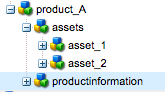
That means, that for such requirements like described you can easily design your application in a way, that all assets to a product are stored below the product itself.

Or for each product page there is a matching folder in the DAM where all the assets reside. So instead of a JCR query you just do a lookup of a node at a fixed location (in the first example below the subnode “assets”) or you can compute the path for the assets (/content/dam/products/prodcut_A/assets). That single lookup will always be more performant than a query, plus it’s also easier for an author to spot and work with all assets belonging to a product.

Of course this is a very simplified case. Typically requirements are more complex, also asset reuse is often required. This approach does not work that easy anymore.
And there is no real recipe for it, but ways how to deal with it.

In case of creating such relations between content we often use tags. Content having the same tag are related, and can be added automatically in the list of related content or assets. Using tags as a level of indirection is ok and in the context of the forum post also quite performant (albeit the resolution itself is powered by a single query).

Another approach to come up with modelling the content structure is to look at the workflows the authoring users are supposed to use. Because they also need to understand the relationship between content, which normally leads to something intuitive. Looking at these details might also give you a hint how it can be modeled; maybe just having the referenced assets as paths as part of the product is already enough.

So, as already said in an earlier post, there are many ways to come up with a decent content architecture, but rarely recipies. In most cases it pays of to invest time into it and consider the effects it has on the authoring workflow, performance and other operational aspects.

Creating the content architecture with AEM

In the last post I tried to describe the difference between the information architecture and content architecture; and from an architectural point of the view the content architecture is quite important, because based on that your application design will emerge. But how can you get to a stable and well-thought content structure?

Well, there’s no bullet-proof approach for it. When you design the content architecture for an AEM-based application it’s best to have some experience with the hierarchical approach offered by the repository approach. I will try to outline a process which might help you to get you there.
It’s not a definite guideline and I will never guarantee that it will work for you, as it is just based on my experience with the projects I did. But I hope that it will give some input and can act as a kind of checklist for you. My colleague Alex Klimetschek did a presentation at the adaptTo() conference 2012 about it.

The tree

But before we start, I want to remind you of the fact, that everything you do has to fit into the JCR tree. This tree is typically a big help, because we often think in trees (think of decision trees, divide-and-conquer algorithms, etc), also the URL is organized in a tree-ish way. Many people in IT are familiar with the hierarchical way filesystems are organized, so it’s both an comfortable and easy-to-explain approach.

Of course there are cases, where it makes things hard to model; but you are hit that problem, you should try to choose a different approach. Building any n:m relation in the AEM content tree is counter-intuitive, hard to implement and typically not really performant.

Start with the navigation

Coming from the information architecture you typically have some idea, how the navigation in the site should look like. In the typical AEM-based site, the navigation is based on the content tree; that means that traversing the first 2-3 levels of your site tree will create the navigation (tree). If you map it the other way around, you can get from the navigation to the site tree as well.

This definition definitivly has impact on your site, as now the navigation is tied to your content structure; changing one without the other is hard. So make your decision carefully.

Consider content-reuse

As the next step consider the parts of the website, which have to be identical, e.g. header and footer. You should organize your content in a way, that these central parts are maintained once for the whole site. And that any change on them can be inherited down the content tree. When you choose this approach, it’s also very easy to implement a feature, which allows you to change that content at every level, and inherit the changed content down the tree, effectively breaking the inheritance at this point.

If you are this level, also consider the fact of dispatcher invalidation. Whenever you change such a “centralized” content, it should be easily possible to purge the dispatcher cache; in the best case the activation of the changed content will trigger the invalidation of all affected pages (not more!), assuming that you have your /statefilelevel parameter set correctly.

Consider access control

As third step let’s consider the already existing structure under the aspect of access control, which you will need on the authoring environment.
On smaller sites this topic isn’t that important, because you have only a single content team, which maintains all the page. But especially in larger organizations you have multiple teams, and each team is responsible for dedicated parts of the site.

When you design your content structure, overlay the content structure with these authoring teams, and make sure, that you can avoid any situation, where a principal has write access to a page, but not to any of the child pages. While this is not always possible, try to follow this guidelines regarding access control:

  • When looking from the root node in the tree to node on a lower level, always add more privileges, but do not remove them.
  • Every author for that site should have read access to the whole site.

If you have a very complicated ACL setup (and you’ve already failed to make it simpler), consider to change your content structure at this point, and give the ACL setup a higher focus than for example the navigation.

My advice at this point: Try to make your ACL setup very easy; the more complex it gets the more time you will spend in debugging your group and permission setup to find out, what’s going on in a certain situation; also the harder it will be to explain it to your authors.

Multi-Site with MSM

As you went now through these 3 steps, you are through with it and already have some idea how your final content structure needs to look like. There is another layer of complexity if you need to maintain multiple sites using the multi-site-manager (MSM). The MSM allows you to inherit content and content structure to another site, which is typically located in a parallel sub-tree of the overall content tree. Choosing the MSM will keep your content structures consistent, which also means, that you need to plan and setup your content master (in MSM terms it is called the blueprint) in a way, that the resulting structure is well-suited for all copies of it (in MSM: live copies).

And on top of the MSM you can add more specifics, features and requirements, which also influence the content structure of your site. But let’s finish here for the moment.

When you are done with all these exercises, you already have a solid basis and considered a lot of relevant aspects. Nevertheless you should still ask others for a second opinion. Scrutiny pays really off here, because you are likely to live with this structure for a while.